Discord is one of the most popular communication platforms, offering voice chat, messaging, and community features. It’s widely used by gamers, remote teams, and social groups. However, not everyone finds Discord suitable due to server limitations, privacy concerns, or complex features. If you’re looking for Discord alternatives, this blog covers the 30 best apps like Discord that offer similar features, but have their own unique offerings.
We’ll explore a number of apps like Discord that have established themselves as potential Discord competitors.
What is the Discord App Used For?
Discord is a real-time communication platform that provides users with text, voice, and video chat. It’s primarily used for:
- Gaming Communities: Gamers use Discord for coordinating multiplayer matches, strategizing, and socializing.
- Remote Work & Collaboration: Many businesses and teams use Discord for group discussions and meetings.
- Online Communities & Social Groups: Creators, influencers, and hobbyists use Discord to build private communities.
- Education & Learning: Some students and educators use Discord for study groups and online discussions.
Why Look for Discord Alternatives?
While Discord is a powerful tool, it may not be the right fit for everyone. Here are some common reasons people look for other apps similar to Discord:
- Privacy Concerns: Discord tracks user activity and data, which some users find concerning.
- Server Limitations: Free Discord servers have limited file upload sizes and customization options.
- Complexity: Some users find Discord’s interface overwhelming, especially non-gamers.
- No End-to-End Encryption: Discord messages aren’t fully encrypted, raising security concerns.
- Better Features Elsewhere: Some platforms offer better organization tools, moderation, or simpler UI.
Top 30 Apps Like Discord
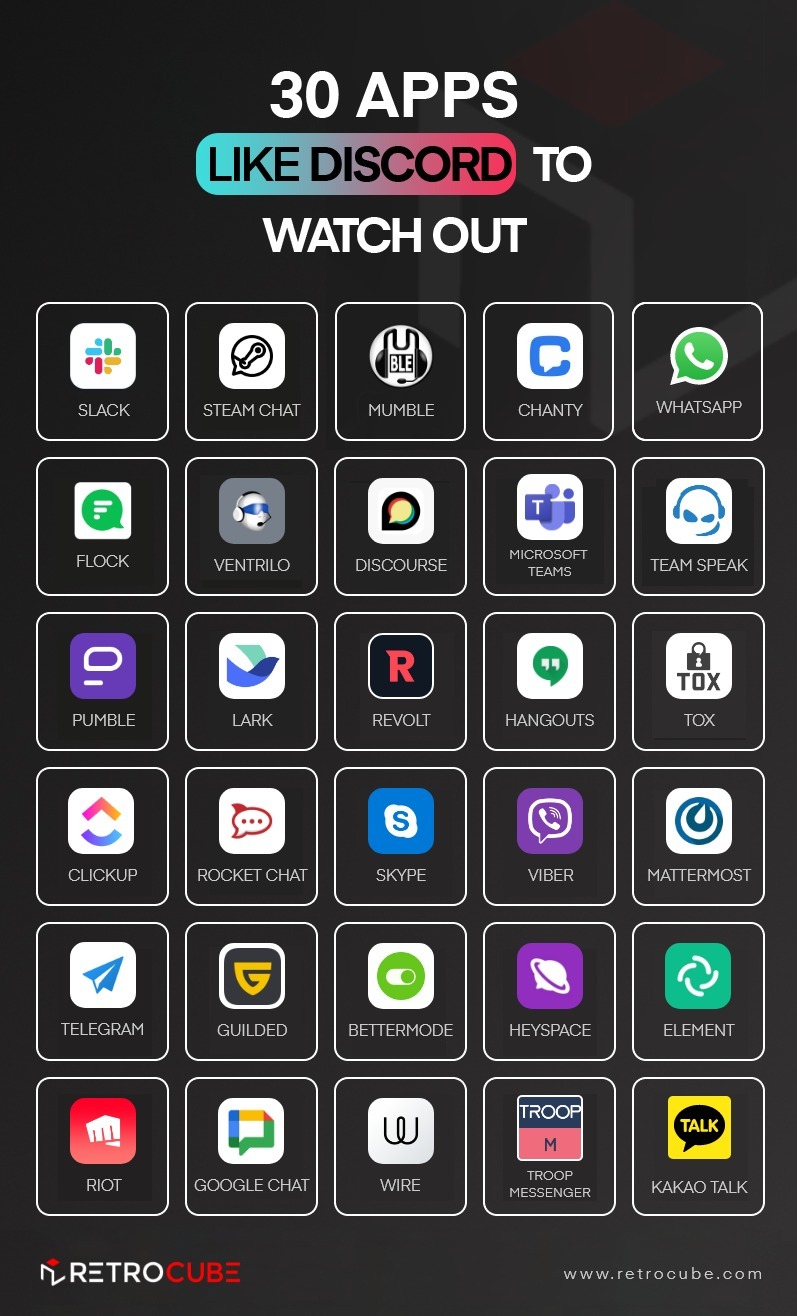
There is no doubt that Discord is a great app and a trailblazer in its domain. Though discord has a lot to offer, it may not be everyone’s cup of tea. If you’re one of those people who like Discord but are looking for a Discord alternative for added features, here are 30 of the best options.
1. Slack – Best for Professional Teams
Slack is a business communication platform designed for professional teams. It offers organized messaging, app integrations, and project collaboration tools, making it a perfect alternative for work-based communication.
Features:
- Organized communication with channels for different topics.
- App integrations with Google Drive, Trello, Zoom, and more.
- Private and public group chats for secure discussions.
Pros:
- Excellent for team collaboration.
- Powerful integrations with productivity tools.
- Easy-to-use UI with threaded messaging.
Cons:
- Free plan has limited storage and message history.
- Not ideal for gaming communities.
2. Microsoft Teams – Best for Business Communication
Microsoft Teams is a corporate-focused chat and video conferencing platform. It integrates seamlessly with Microsoft 365, making it an excellent choice for businesses looking for a robust collaboration tool.
Features:
- Real-time file sharing and collaboration through Microsoft 365.
- High-definition video conferencing with screen sharing.
- Enterprise-grade security and compliance for professional teams.
Pros:
- Best choice for companies using Microsoft tools.
- Secure, encrypted communication.
- Great for remote teams and large organizations.
Cons:
- Requires a Microsoft subscription for full features.
- Overwhelming UI for casual users.
3. Telegram – Best for Privacy & Large Groups
Telegram is a secure, cloud-based messaging app known for its privacy-focused features and ability to host large group chats. Unlike Discord, Telegram provides end-to-end encrypted chats and doesn’t track user activity.
Features:
- Secret Chats with end-to-end encryption for total privacy.
- Ability to create massive group chats with up to 200,000 members.
- Cloud-based messaging that syncs across all devices.
Pros:
- Strong security and privacy features.
- Fast messaging with unlimited cloud storage.
- Lightweight and easy to use.
Cons:
- Lacks built-in voice channels like Discord.
- Less community-focused features.
4. Guilded – Best for Gaming Communities
Guilded is a gaming-focused chat app widely known as one of the biggest Discord competitors. It offers higher voice quality, better server customization, and built-in tournament management features.
Features:
- Higher-quality voice chat than Discord.
- Tournament management tools for eSports teams.
- Advanced server customization with free unlimited file uploads.
Pros:
- Great for gamers and eSports teams.
- Better voice quality than Discord.
- Completely free with no premium restrictions.
Cons:
- Smaller user base than Discord.
- Lacks third-party integrations.
5. Mumble – Best for Low-Latency Voice Chat
Mumble is an open-source, VoIP application offering low-latency, high-quality voice chat. It’s perfect for gamers who need real-time voice communication without lag.
Features:
- End-to-end encryption for secure voice chat.
- Minimal CPU usage, making it lightweight.
- Self-hosting capabilities for private servers.
Pros:
- Superior voice quality and low-latency chat.
- Highly secure and privacy-focused.
- Great for large-scale gaming communication.
Cons:
- Outdated UI and harder to set up.
- Limited text chat features.
6. Element – Best for Secure Messaging
Element is a decentralized, privacy-focused chat platform built on the Matrix protocol. Unlike Discord, Element provides full end-to-end encryption, making it ideal for privacy-conscious users.
Features:
- Decentralized and open-source for total control.
- End-to-end encrypted chat and calls.
- Supports self-hosting for extra security.
Pros:
- Best choice for privacy and security.
- No centralized data tracking.
- Highly customizable.
Cons:
- Requires technical knowledge to set up.
- Not gaming or business-focused.
7. TeamSpeak – Best for Competitive Gamers
TeamSpeak is a voice communication tool used by eSports professionals due to its high-quality audio and military-grade encryption.
Features:
- Encrypted voice communication for security.
- Customizable servers with different permission levels.
- Offline/LAN mode for local communication.
Pros:
- Excellent for eSports teams.
- Highly customizable.
- Minimal latency for real-time conversations.
Cons:
- No built-in text chat.
- Paid hosting required for private servers.
8. Ventrilo – Lightweight Alternative for Voice Chat
Ventrilo is a lightweight, high-quality VoIP app designed for minimal CPU usage and fast communication. It’s particularly popular among older gaming communities and offers secure, private voice chat servers.
Features:
- Minimal CPU and memory usage, ensuring smooth performance.
- High-quality voice chat with minimal latency.
- Private servers with customizable admin controls.
Pros:
- Low system resource consumption.
- Simple and reliable for voice communication.
- No tracking or data collection.
Cons:
- Outdated UI, lacks modern features.
- No built-in text chat, primarily voice-based.
9. Zoom – Best for Video Conferencing
Zoom is a video conferencing platform widely used for business meetings, online learning, and team collaboration. Unlike Discord, Zoom focuses on video-first communication, making it ideal for professional teams.
Features:
- HD video calls and screen sharing.
- Breakout rooms for smaller group discussions.
- Supports up to 1,000 participants in large meetings.
Pros:
- User-friendly and widely adopted.
- Great for virtual meetings and webinars.
- Reliable video quality and connectivity.
Cons:
- Free plan limits meetings to 40 minutes.
- Not optimized for gaming communities.
10. Skype – Best for International Calls
Skype is one of the oldest and most well-known VoIP applications, offering free international voice and video calls. It’s widely used by businesses, freelancers, and individuals for cross-platform communication.
Features:
- Screen sharing and real-time file transfer.
- Group video calls with up to 100 participants.
- Works across desktop, mobile, and web.
Pros:
- Reliable for personal and business communication.
- Free international voice and video calls.
- Microsoft integration for productivity tools.
Cons:
- Lacks advanced community-building tools.
- Higher bandwidth usage compared to Discord.
11. Chanty – Best for Small Teams
Chanty is a team chat application that provides text messaging, voice calls, and task management features, making it a great alternative to Slack and Discord for work-related collaboration.
Features:
- Unlimited message history in the free plan.
- Built-in task management for team collaboration.
- AI-powered search for quick access to messages.
Pros:
- Lightweight and easy to use.
- Affordable alternative to Slack.
- Supports integrations with other tools.
Cons:
- Limited features compared to Discord.
- Not suitable for gaming or community servers.
12. Signal – Best for Secure Private Chats
Signal is a highly secure messaging app that focuses on privacy and encrypted communication. Unlike Discord, which lacks end-to-end encryption, Signal ensures total security.
Features:
- End-to-end encryption for texts, calls, and media.
- Disappearing messages for added privacy.
- Open-source with no ads or tracking.
Pros:
- Best for private, secure conversations.
- Fast and lightweight messaging.
- Works on all major platforms.
Cons:
- Lacks community-building features like Discord.
- Not optimized for voice or video chat.
13. Rocket.Chat – Best Open-Source Alternative
Rocket.Chat is a self-hosted, open-source communication tool, allowing businesses and teams to control their data and conversations privately.
Features:
- Fully customizable with self-hosting options.
- Integrates with apps like Jira, Trello, and GitHub.
- End-to-end encryption for secure messaging.
Pros:
- Excellent for privacy-conscious teams.
- Completely free and open-source.
- Highly customizable for businesses.
Cons:
- Requires technical expertise to set up.
- Not ideal for gaming communities.
14. Mattermost – Best for Developer Teams
Mattermost is a self-hosted, secure collaboration tool designed for developer teams looking for an open-source Slack alternative.
Features:
- Fully customizable and open-source.
- End-to-end encryption for private communications.
- Integrates with DevOps tools like GitHub and Jenkins.
Pros:
- Excellent for technical teams and businesses.
- Self-hosted for better security.
- Supports messaging, voice, and video calls.
Cons:
- Requires server hosting.
- Steeper learning curve compared to Discord.
15. Zello – Best for Push-to-Talk Communication
Zello is a push-to-talk (PTT) app that turns your device into a walkie-talkie, making it perfect for teams that need instant voice communication.
Features:
- Instant voice messaging with PTT functionality.
- Private and public channels for team discussions.
- Works even on low-bandwidth connections.
Pros:
- Fast and efficient for instant communication.
- Lightweight and battery-friendly.
- Great for field teams and businesses.
Cons:
- No video chat or advanced text features.
- Not ideal for large community discussions.
16. Tox – Best for Decentralized Messaging
Tox is a fully decentralized, peer-to-peer chat app that ensures total privacy without third-party interference.
Features:
- No central servers, fully decentralized.
- Encrypted text, voice, and video communication.
- Completely free and open-source.
Pros:
- Maximum privacy and anonymity.
- No data tracking or storage.
- Lightweight and easy to use.
Cons:
- Lacks a large user base.
- Limited third-party integrations.
17. Troop Messenger – Best for Workplace Communication
Troop Messenger is a team communication and collaboration tool designed for businesses, offering features similar to Slack but with a more cost-effective approach. It’s an excellent alternative to Discord for work-related messaging.
Features:
- Instant messaging, voice, and video calls.
- Self-hosted and SaaS-based deployment options.
- Integrates with Google Drive, Dropbox, and productivity tools.
Pros:
- Affordable compared to Slack.
- Strong security and admin controls.
- Great for remote teams and business collaboration.
Cons:
- Not optimized for gaming or casual communities.
- Lacks advanced bot support like Discord.
18. WhatsApp – Best for Simple Group Chats
WhatsApp is a popular messaging app that provides text, voice, and video communication, making it a great option for those looking for a basic alternative to Discord.
Features:
- End-to-end encryption for secure messaging.
- Group video calls with up to 32 participants.
- Cross-platform support (Android, iOS, Web, and Desktop).
Pros:
- User-friendly and widely used.
- Fast and reliable for small groups.
- Completely free with no ads.
Cons:
- Lacks server-based community features.
- Not ideal for large-scale communities.
19. Threema – Best for Encrypted Communication
Threema is a privacy-focused chat app that offers secure and anonymous messaging without requiring a phone number.
Features:
- End-to-end encryption for all messages and calls.
- Self-hosted servers for businesses.
- No personal data collection or tracking.
Pros:
- Maximum privacy and anonymity.
- No need to link a phone number or email.
- Highly secure for sensitive conversations.
Cons:
- Paid app with no free version.
- Lacks extensive group and community features.
20. Google Chat – Best for Google Workspace Users
Google Chat is Google’s official business messaging app, designed for teams using Google Workspace (Gmail, Docs, Meet, etc.).
Features:
- Deep integration with Google Workspace (Docs, Sheets, Drive).
- Threaded conversations for organized discussions.
- Secure messaging with Google security protocols.
Pros:
- Best for Google users.
- Seamless transition between email and chat.
- Great for business and productivity-focused teams.
Cons:
- Not ideal for gaming or entertainment communities.
- Lacks extensive voice chat features.
21. Wire – Best for Businesses Looking for Secure Chat
Wire is a highly secure messaging app that focuses on end-to-end encrypted communication for businesses and teams.
Features:
- Zero-trust security model with full encryption.
- Group messaging, voice calls, and file sharing.
- Compliant with EU data protection regulations.
Pros:
- Excellent for business security and privacy.
- Easy-to-use interface with professional tools.
- Great alternative to Slack for encrypted messaging.
Cons:
- Paid plans required for businesses.
- Not ideal for casual users or gamers.
22. Jitsi Meet – Best for Open-Source Video Conferencing
Jitsi Meet is a free, open-source video conferencing tool with no restrictions, making it an excellent alternative to Discord’s voice and video chat features.
Features:
- Unlimited, free video conferencing.
- No account required to host meetings.
- Self-hosting option for enhanced privacy.
Pros:
- Completely free with no restrictions.
- Highly secure and private.
- Lightweight and easy to use.
Cons:
- Lacks advanced community-building tools.
- No direct messaging or text-based groups.
23. Flock – Best for Business Collaboration
Flock is a team messaging and collaboration tool that offers features similar to Slack but with a focus on simpler workflows.
Features:
- Threaded messaging and direct chats.
- Built-in task management and notes.
- File sharing and search functionality.
Pros:
- Easier to use than Slack.
- Great for startups and small businesses.
- Affordable pricing plans.
Cons:
- Limited free plan compared to competitors.
- Not ideal for gaming or casual communities.
24. Tox – Best for Completely Decentralized Chat
Tox is a fully decentralized chat app that operates without central servers, ensuring full privacy.
Features:
- Peer-to-peer encrypted messaging and calling.
- No central servers or data collection.
- Voice and video chat included.
Pros:
- Ultimate privacy and anonymity.
- Completely free with no ads.
- Works even in censored regions.
Cons:
- Limited user base.
- Requires technical knowledge to set up.
25. Talky – Best for Quick, No-Registration Video Calls
Talky is a browser-based video chat app that allows users to create and join calls without registration.
Features:
- No downloads or sign-ups required.
- Easy screen sharing and link-based invites.
- Secure, private rooms.
Pros:
- Super simple to use.
- No installation required.
- Great for quick one-on-one meetings.
Cons:
- Limited features compared to Discord.
- Lacks community and group messaging options.
26. Mattermost – Best for Developer Teams
Mattermost is an open-source, self-hosted chat platform designed for developer teams and IT professionals. It is widely regarded as one of the best self-hosted alternatives to Slack and Discord, offering strong security, integration capabilities, and customization options.
Features:
- Self-hosted and open-source, allowing full control over data and privacy.
- Threaded conversations for structured communication.
- Integrations with GitHub, Jira, GitLab, and CI/CD tools for developers.
- Multi-platform support (Web, Desktop, and Mobile apps).
Pros:
- Ideal for developer and IT teams.
- More customizable than Discord or Slack.
- Strong security with on-premise hosting options.
Cons:
- Requires technical knowledge to set up and manage.
- Not ideal for gaming or casual communities.
27. Zoho Cliq – Best for Small Business Messaging
Zoho Cliq is a team communication tool that integrates seamlessly with Zoho’s suite of business applications, making it a great choice for businesses looking for a budget-friendly alternative to Slack and Discord.
Features:
- Threaded messaging and organized conversations.
- Built-in task management and workflow automation.
- Integration with Zoho’s ecosystem (CRM, Docs, and more).
- Multi-channel chat for structured communication.
Pros:
- Affordable compared to Slack or Microsoft Teams.
- Great for businesses already using Zoho tools.
- Secure and easy to use for business collaboration.
Cons:
- Limited features for gaming or entertainment communities.
- Free plan has restrictions on message history and storage.
28. Facebook Messenger – Best for Casual Group Chats
Facebook Messenger is a widely used messaging app that allows users to chat, share media, and make voice/video calls. It’s a simple alternative to Discord for those who just need basic communication tools without the complexity of servers and channels.
Features:
- Instant messaging with groups and direct messages.
- Voice and video calling with screen-sharing options.
- Cross-device syncing between mobile, web, and desktop.
- Reacts, stickers, and GIFs for fun interactions.
Pros:
- Easy to use and widely accessible.
- Great for social groups and casual chats.
- No need for additional downloads if you have Facebook.
Cons:
- Lacks community-building and server features.
- Not privacy-focused (Facebook collects user data).
29. AirSend – Best for Managing Small Communities
AirSend is a collaboration and community-building tool designed for businesses, freelancers, and small teams. It combines messaging, file sharing, and task management into one platform, making it a great alternative to Discord for professional and hobbyist communities.
Features:
- Organized channels for structured communication.
- File sharing and task management in one platform.
- Voice and video calling for small groups.
- Built-in cloud storage for easy access to shared documents.
Pros:
- Perfect for small teams and niche communities.
- Great for professional collaboration.
- More structured than Discord for productivity.
Cons:
- Not designed for gaming or large-scale public communities.
- Lacks advanced integrations compared to Slack or Mattermost.
30. Mighty Networks – Best for Building Paid Communities
Mighty Networks is a platform for creating and monetizing online communities, making it a great alternative to Discord for businesses, influencers, and content creators who want to sell memberships or build exclusive groups.
Features:
- Custom-branded communities with membership options.
- Integrated courses, events, and live streaming.
- Mobile app support for on-the-go engagement.
- Discussion forums and direct messaging features.
Pros:
- Ideal for businesses, creators, and influencers.
- Allows monetization through paid memberships.
- More organized than Discord for structured content and courses.
Cons:
- Paid plans can be expensive.
- Lacks real-time voice chat for gaming communities.
How Much Does it Cost to Build An App Like Discord?
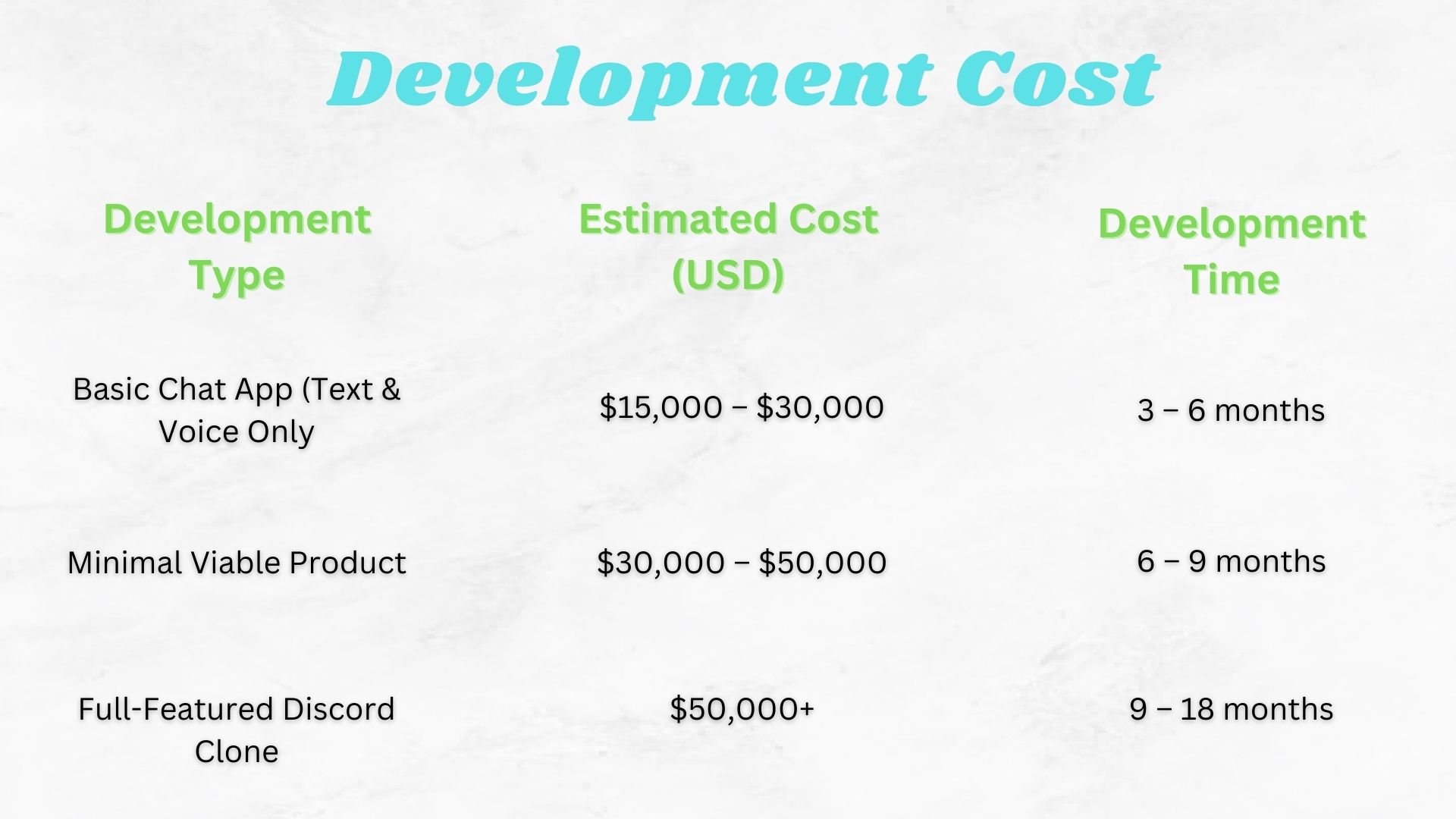
Developing an app like Discord requires a significant investment in backend infrastructure, real-time communication technology, security, and multi-platform support. The total cost depends on the features, complexity, team location, and development approach. Without bombarding you with the technicalities, here is a brief overview of how much it costs to build apps like Discord.
Main Cost Factors
- Features & Functionality – Advanced features like screen sharing, AI moderation, low-latency voice chat, and end-to-end encryption significantly impact costs.
- Technology Stack – Using custom-built real-time communication solutions vs. third-party APIs (WebRTC, Agora, Twilio) affects budget.
- Development Team – Costs vary depending on team location. Resources hired outside from the USA and UK are usually considered cheaper alternatives to hiring local developers due to currency difference.
- Infrastructure & Hosting – Running real-time chat requires AWS, Google Cloud, or Azure services, costing $5,000 – $50,000+ per month as user traffic scales.
Ways to Reduce Costs
Start with an MVP – Build essential features first, then scale.
Use Open-Source Solutions – WebRTC for video calls, Firebase for notifications.
Outsource to Cost-Effective Regions – Developers in Eastern Europe and South Asia offer lower rates.
Opt for Cross-Platform Development – Using React Native or Flutter reduces separate iOS and Android development costs.
Final Thoughts
While Discord remains a popular choice, it isn’t the only option available. Whether you’re looking for gaming-focused Discord alternatives, privacy-first messaging apps, or workplace communication tools, this list offers a wide variety of options to cater different needs. The world of web and app development has evolved significantly with numerous products on offer. Choose the best app that caters your needs and streamline your daily life communication.
Frequently Asked Questions
Slack and Guilded are considered Discord’s biggest competitors, depending on the use case. Slack is popular for teams, while Guilded is preferred by gamers.
Adults use Discord for gaming, work collaboration, social groups, study sessions, and hobby-based communities.
Kid-friendly alternatives include Messenger Kids, Jitsi Meet, and Google Hangouts, which offer safe online communication for children.
Gamers use Discord for real-time voice chat, community engagement, and easy game coordination.
Yes, users can earn money through Discord servers by offering premium memberships, donations, and custom services.
You can search for public servers using Discord’s "Explore" feature, browse gaming forums, or join via invite links.
Product consult
Your Pp Like Discord-style product deserves a real build plan.
Share the must-haves. We’ll flag risks, suggest an MVP cut, and outline how we’d ship it.